Search Knowledge Base Articles
Student Information : How to check Class Subject Report?
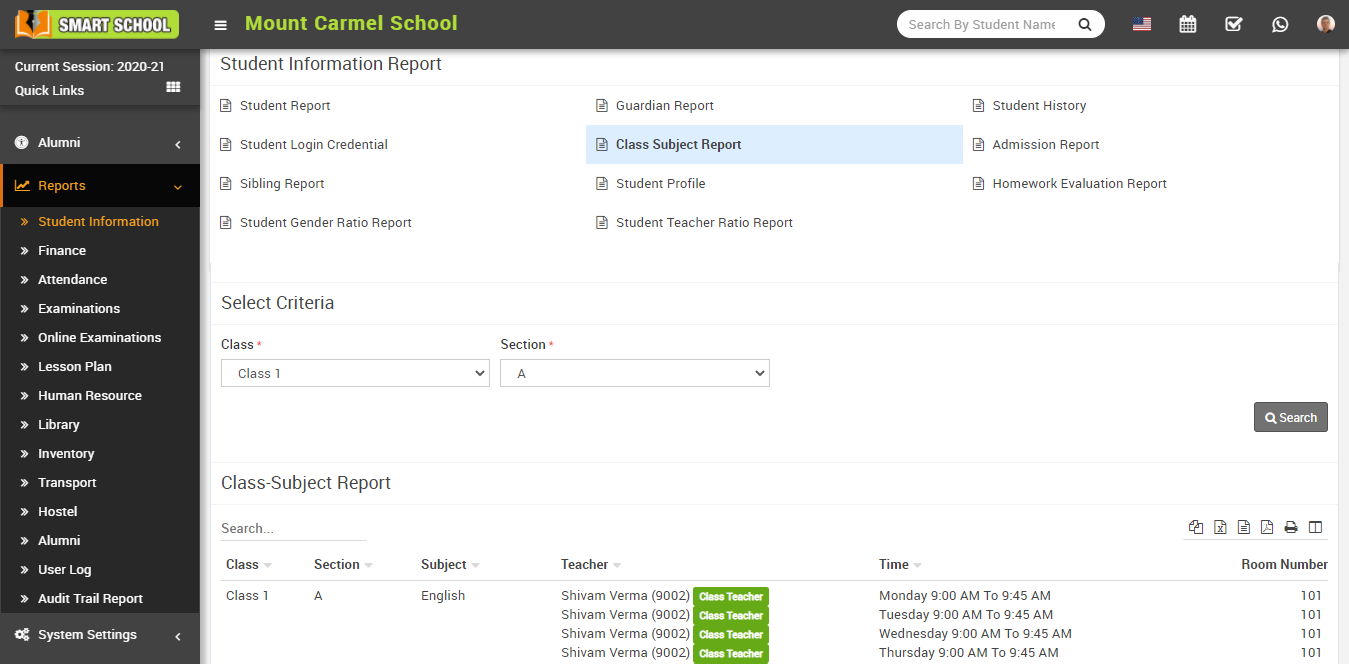
To check the class subject report, go to Reports > Student Information Report click on Class Subject Report. Here select Class and Section and then click on Search button. Here you can see class-subject details like Class, Section, Subject, Teacher, Time, Room Number.
Did you find this article useful?
Related Articles
-
Online Admissions : How to manage online admission setting?
To manage online admission setting, login from Superadmin/Admin panel then go to System Setting > Online Admission Setting, this will redirect... -
Online Admissions : How to fill online admission form?
To fill online admission form, go to smart school domain then click on the Online Admission tab then fill Basic Details ( Class, F... -
Online Admissions : How to review online admission form details?
To review online admission form details, go to your smart school domain and click on the online admission tab then click on the Check Your F... -
Online Admissions : How to print online admission form receipt?
To print online admission form receipt, go to Online Admission Review Details page and then click on the Print icon present on the... -
Online Admissions : How to check online admission student list?
To check online admission student list, login from Superadmin/Admin panel then go to Student Information > Online Admission, here yo...