Search Knowledge Base Articles
Website (Front CMS) : How to upload file in Media Manager?
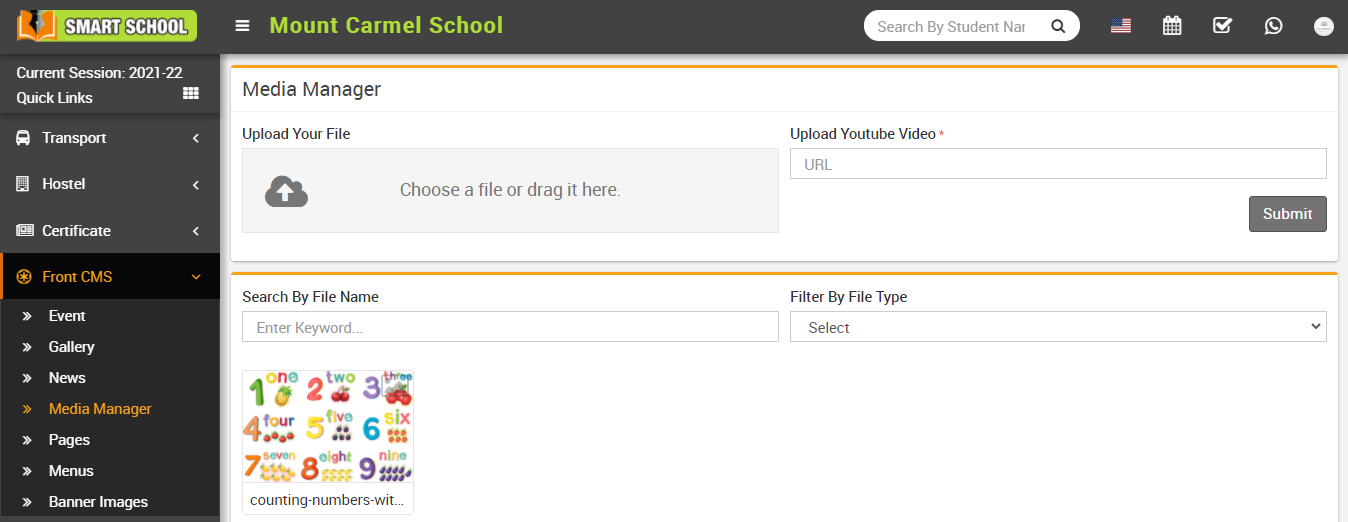
To upload file, go to Front CMS > Media Manager then Choose or drag file in the Upload Your File option then enter Upload Youtube Video URL and then click on Submit button. You can search media by entering any keyword in Search By File Name textbox and you can also search any file by selecting file type ( like video, text,zip,Rar etc.).
Did you find this article useful?
Related Articles
-
Online Admissions : How to manage online admission setting?
To manage online admission setting, login from Superadmin/Admin panel then go to System Setting > Online Admission Setting, this will redirect... -
Online Admissions : How to fill online admission form?
To fill online admission form, go to smart school domain then click on the Online Admission tab then fill Basic Details ( Class, F... -
Online Admissions : How to review online admission form details?
To review online admission form details, go to your smart school domain and click on the online admission tab then click on the Check Your F... -
Online Admissions : How to print online admission form receipt?
To print online admission form receipt, go to Online Admission Review Details page and then click on the Print icon present on the... -
Online Admissions : How to check online admission student list?
To check online admission student list, login from Superadmin/Admin panel then go to Student Information > Online Admission, here yo...